Data Engineering
This project implements a fully containerized data engineering workflow for downloading, ingesting, transforming, validating, and preparing NYC Yellow Taxi Trip Data. It uses Apache Spark for computation, Apache Airflow for orchestration, MinIO as Amazon S3-compatible object storage, and DuckDB as an analytics warehouse. The entire environment is reproducible using Docker Compose and set to run locally.
1. Project Overview
The workflow simulates a modern data engineering architecture with dedicated layers:
- Local Layer – Raw TLC data downloaded directly to the local filesystem.
- Landing Layer (MinIO/S3) – Central storage for raw but structured data.
- Prepared Layer (MinIO/S3) – Cleaned, filtered and transformed datasets generated via Spark Pipeline.
- Warehouse Layer (DuckDB) – Analytical storage loaded from the Prepared layer.
- EDA Layer (JupyterLab) – Data exploration and downstream modeling using notebooks.
2. Repository Structure
├── airflow
│   ├── dags
│   │   └── taxi_pipeline_dag.py
│   ├── Dockerfile
│   └── requirements.txt
├── config
│   └── storage_config.yaml
├── data
│   └── yellow_tripdata_2024-01.parquet
├── infra
│   └── docker
│       ├── notebook.Dockerfile
│       └── spark.Dockerfile
├── notebooks
│   ├── 01_raw_data_exploration.ipynb
│   └── 02_prepared_data_exploration.ipynb
├── spark_jobs
│   ├── ingest_landing.py
│   └── transform_prepared.py
├── warehouse
│   └── taxi.duckdb
├── README.md
├── docker-compose.yml
├── LICENSE
└── requirements.txt
3. Dataset
Source and availability
- Trip data: NYC TLC Yellow Taxi Trip Records (monthly Parquet files).
- Zone reference data: NYC TLC Taxi Zone Lookup Table (CSV).
This project is configured and tested for years up to and including 2024 (e.g., 2024-01).
The TLC continues to publish newer months/years, but schemas may change over time (for example, additional columns may appear), so treat 2025+ as “use at your own risk” unless you update your transformations accordingly.
Manual download [optional]
mkdir -p data

# Example month (2024-01)
curl -L "https://d37ci6vzurychx.cloudfront.net/trip-data/yellow_tripdata_2024-01.parquet"   -o data/yellow_tripdata_2024-01.parquet

# Taxi zones
curl -L "https://d37ci6vzurychx.cloudfront.net/misc/taxi_zone_lookup.csv"   -o data/taxi_zone_lookup.csv
Raw trip record columns
| Column | Type | Description |
|---|---|---|
| VendorID | int | TPEP provider code (vendor). |
| tpep_pickup_datetime | datetime | Trip meter start timestamp. |
| tpep_dropoff_datetime | datetime | Trip meter stop timestamp. |
| passenger_count | float/int | Passenger count (driver-entered). |
| trip_distance | float | Trip distance in miles (taximeter). |
| RatecodeID | float/int | Final rate code for the trip. |
| store_and_fwd_flag | string | “Store and forward” indicator. |
| PULocationID | int | Pickup TLC Taxi Zone ID. |
| DOLocationID | int | Drop-off TLC Taxi Zone ID. |
| payment_type | int | Payment type code. |
| fare_amount | float | Fare amount. |
| extra | float | Extras/surcharges (varies). |
| mta_tax | float | MTA tax. |
| tip_amount | float | Tip amount. |
| tolls_amount | float | Tolls amount. |
| improvement_surcharge | float | Improvement surcharge. |
| total_amount | float | Total amount charged. |
| congestion_surcharge | float | Congestion surcharge. |
| Airport_fee | float | Airport fee (may be null / not present in older years). |
Note: the TLC schema can vary slightly across years.
Taxi zone lookup columns
| Column | Type | Description |
|---|---|---|
| LocationID | int | Taxi Zone ID used by TLC trip files. |
| Borough | string | Borough name. |
| Zone | string | Zone name. |
| service_zone | string | Service zone label (e.g., “Yellow Zone”, “Boro Zone”). |
4. System Architecture
Component overview
| Component | Responsibility |
|---|---|
| Airflow | Orchestrates the ETL pipeline end-to-end. |
| Spark | Performs ingestion and transformation into Landing and Prepared layers. |
| MinIO | S3-compatible storage for Landing and Prepared zones. |
| DuckDB | Analytical warehouse loaded from the Prepared layer. |
| JupyterLab | Exploration and EDA environment. |
| Docker Compose | Orchestrates and isolates the entire system. |
High-level flow

5. Data Layouts in MinIO
Landing zone
- Monthly trips:
s3://<bucket>/landing/taxi/year=YYYY/month=MM/
    part-*.parquet
- Taxi zones:
s3://<bucket>/landing/reference/taxi_zones/
    part-*.parquet
Prepared zone
Prepared trips (enriched with zone attributes; partitioned by day):
s3://<bucket>/prepared/taxi/year=YYYY/month=MM/
    pickup_date=YYYY-MM-DD/
        part-*.parquet
Both paths are dynamically parameterized with year and month, which are provided by Airflow at runtime.
6. Docker Services
Airflow
- Web UI:
http://localhost:8080 - Executes the
taxi_spark_pipelineDAG.
Spark
-
Runs ingestion and transformation:
spark_jobs/ingest_landing.pyspark_jobs/transform_prepared.py
MinIO
- S3 endpoint:
http://localhost:9000 - Console UI:
http://localhost:9001
JupyterLab
- Available at:
http://localhost:8888 - Includes DuckDB and local workspace.
7. Airflow Pipeline
The DAG is defined in:
airflow/dags/taxi_pipeline_dag.py
Tasks
-
download_taxi_data
- Downloads the TLC Parquet file for a given year / month into
data/. - URL pattern:
https://d37ci6vzurychx.cloudfront.net/trip-data/yellow_tripdata_YYYY-MM.parquet - Downloads the Taxi Zone Lookup CSV into
data/(only once, not partitioned):https://d37ci6vzurychx.cloudfront.net/misc/taxi_zone_lookup.csv
- Downloads the TLC Parquet file for a given year / month into
-
ingest_to_landing
- Runs
ingest_landing.pyon Spark with--yearand--month. - Reads local Parquet from
data/. - Writes raw structured data into MinIO Landing:
- Taxi Zones (only once, not partitioned):
s3a://<bucket>/landing/reference/taxi_zones/ - Monthly Trips:
s3a://<bucket>/landing/taxi/year=YYYY/month=MM/
- Taxi Zones (only once, not partitioned):
- Runs
-
transform_to_prepared
- Runs
transform_prepared.pyon Spark with--yearand--month. - Reads Landing data for the selected month.
- Cleans and enriches the data.
- Joins the Taxi Zone Lookup Table twice:
PULocationID→ pickup zone attributes (PU_*)DOLocationID→ drop-off zone attributes (DO_*)
-
Writes the output to the Prepared layer (partitioned by
pickup_date):s3a://<bucket>/prepared/taxi/year=YYYY/month=MM/
- Runs
-
load_to_duckdb
-
Uses DuckDB to read the Prepared Parquet for the selected month.
-
Creates schema and table if needed:
CREATE SCHEMA IF NOT EXISTS taxi.taxi; CREATE OR REPLACE TABLE taxi.taxi.trips_prepared AS SELECT * FROM read_parquet('<prepared_glob>'); -
The
taxi.taxi.trips_preparedtable is overwritten for each pipeline run. After each run, it contains only the data for the triggered year/month.
-
Triggering the DAG
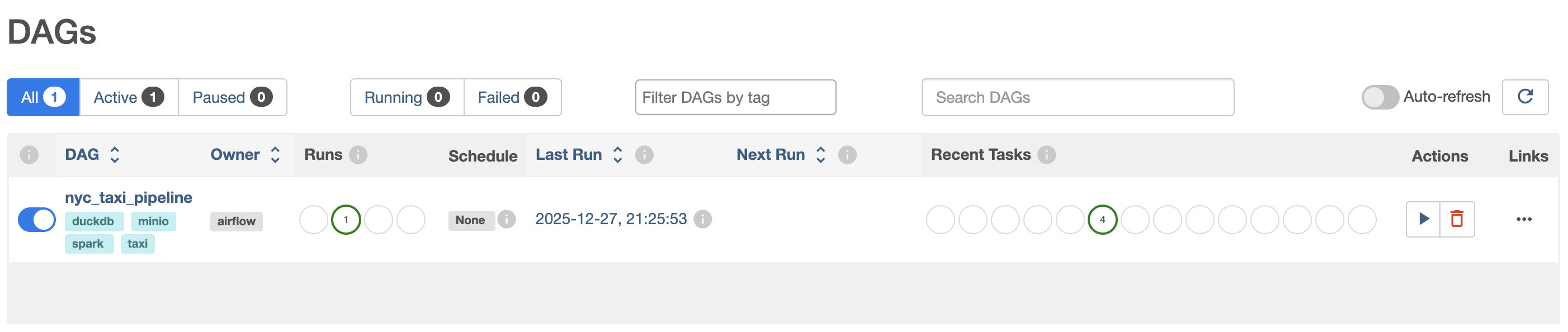
The DAG is manual only (schedule=None).
In the Airflow UI:
- Open the
nyc_taxi_pipelineDAG. - Click Trigger DAG.
- Provide the run configuration as JSON:
{
  "year": 2024,
  "month": 1
}
If year/month are omitted, the DAG falls back to its default params (year=2024, month=1).
8. Spark Jobs
spark_jobs/ingest_landing.py
Responsibilities:
- Ingest monthly trips (local Parquet) →
landing/taxi/year=YYYY/month=MM/ - Ingest taxi zones (local CSV) →
landing/reference/taxi_zones/
spark_jobs/transform_prepared.py
Responsibilities:
- Read monthly trips from Landing.
- Apply basic filters (e.g., negative distances, invalid timestamps).
- Derive:
pickup_date,pickup_hourdropoff_datetrip_duration_minavg_mph
- Join taxi zones twice to add:
PU_Borough,PU_Zone,PU_service_zoneDO_Borough,DO_Zone,DO_service_zone
- Write Prepared data partitioned by
pickup_date.
9. Analytics Schema
The Prepared layer (and thus taxi.taxi.trips_prepared) contains:
- All raw trip fields (see Dataset section), in addition to:
| Column | Description |
|---|---|
| pickup_date | Date derived from tpep_pickup_datetime. |
| pickup_hour | Hour-of-day derived from tpep_pickup_datetime. |
| dropoff_date | Date derived from tpep_dropoff_datetime. |
| trip_duration_min | Trip duration in minutes. |
| avg_mph | Average trip speed in mph (distance / duration). |
| PU_Borough | Borough for pickup zone. |
| PU_Zone | Zone name for pickup zone. |
| PU_service_zone | Service zone label for pickup zone. |
| DO_Borough | Borough for drop-off zone. |
| DO_Zone | Zone name for drop-off zone. |
| DO_service_zone | Service zone label for drop-off zone. |
10. Notebooks
This project includes two Jupyter notebooks for exploratory analysis of the raw TLC trip files and the prepared dataset.
10.1 Raw Data Exploration
File: notebooks/01_raw_data_exploration.ipynb
- Loads a selected month of raw Parquet data (parameterized
YEAR/MONTH) and the taxi zone lookup CSV. - Uses pandas plus Plotly for interactive charts.
- Performs basic data profiling and quality checks (schema, missing values, duplicates, invalid/negative values, distributions).
- Adds derived fields (e.g., trip duration) and reviews temporal and zone-based patterns (top pickup/dropoff zones).
10.2 Prepared Data Exploration
File: notebooks/02_prepared_data_exploration.ipynb
- Connects to DuckDB (
warehouse/taxi.duckdb) and queriestaxi.taxi.trips_prepared. - Configures DuckDB
httpfsfor S3/MinIO access (credentials via environment variables). - Uses SQL aggregations to validate coverage and quality, and to analyze temporal patterns and key distributions.
- Produces summary tables and interactive visualizations (Plotly) for metrics and top zones / OD pairs.
11. Environment Variables
All secrets and configuration are driven through a .env file in the project root.
The repository ships an .env.example file as a starting point. You must create your own .env and fill in values, including AIRFLOW_FERNET_KEY (which is not committed).
Required Variables
MINIO_ROOT_USER=...
MINIO_ROOT_PASSWORD=...
AWS_ACCESS_KEY_ID=...
AWS_SECRET_ACCESS_KEY=...
S3_BUCKET_NAME=...
S3_ENDPOINT_URL=http://minio:9000

AIRFLOW_ADMIN_USER=...
AIRFLOW_ADMIN_PASSWORD=...
AIRFLOW_ADMIN_EMAIL=...

AIRFLOW_FERNET_KEY=...   # must be generated locally (see below)

TZ=UTC
The Fernet key is critical for Airflow to securely store connections and variables. Please follow the next section to generate it and set it in your
.env.
12. Generating AIRFLOW_FERNET_KEY
Airflow uses a Fernet key to encrypt sensitive values (e.g., connections, variables). You must generate a key and set AIRFLOW_FERNET_KEY in your .env.
Option 1: Generate using Docker (recommended)
From the project root:
docker compose run --rm airflow \
  python -c "from cryptography.fernet import Fernet; print(Fernet.generate_key().decode())"
Copy the printed value and set it in .env:
AIRFLOW_FERNET_KEY=<paste-generated-key-here>
Option 2: Generate using local Python
If your host Python has cryptography installed:
python -c "from cryptography.fernet import Fernet; print(Fernet.generate_key().decode())"
13. Setup and Execution
Step 1 — Prepare environment
git clone https://github.com/Yarroudh/dataengineering
cd dataengineering
cp .env.example .env
Edit .env and fill in:
MINIO_ROOT_USER,MINIO_ROOT_PASSWORDAWS_ACCESS_KEY_ID,AWS_SECRET_ACCESS_KEYS3_BUCKET_NAME,S3_ENDPOINT_URLAIRFLOW_ADMIN_USER,AIRFLOW_ADMIN_PASSWORD,AIRFLOW_ADMIN_EMAIL- Generate and set
AIRFLOW_FERNET_KEY(see section 12)
Step 2 — Build services
docker compose build
Step 3 — Start services
docker compose up -d
Step 4 — Access UIs
| Service | URL |
|---|---|
| Airflow | http://localhost:8080 |
| MinIO Console | http://localhost:9001 |
| JupyterLab | http://localhost:8888 |
Step 5 — Run the pipeline via Airflow
-
Open Airflow at
http://localhost:8080. -
Log in using the admin credentials from
.env. -
Open the
nyc_taxi_pipelineDAG. -
Click Trigger DAG.
-
Provide year/month, for example:
{ "year": 2024, "month": 1 } -
Monitor tasks:
download_taxi_dataingest_to_landingtransform_to_preparedload_to_duckdb
After a successful run, DuckDB (warehouse/taxi.duckdb) contains taxi.taxi.trips_prepared for the selected month.
Step 6 — Explore data in JupyterLab
- Open
http://localhost:8888. -
Run:
notebooks/01_raw_data_exploration.ipynb(raw profiling)notebooks/02_prepared_data_exploration.ipynb(prepared data)
14. Troubleshooting
Containers not starting
docker compose logs <service>
Airflow cannot parse the DAG
- Ensure Airflow dependencies include
duckdbandrequestsinairflow/requirements.txt. -
Rebuild Airflow:
docker compose build airflow
docker compose up -d airflow
Spark cannot access MinIO
- Verify
AWS_ACCESS_KEY_IDandAWS_SECRET_ACCESS_KEYin.env. - Confirm the correct bucket name in
S3_BUCKET_NAME. - Ensure
S3_ENDPOINT_URLishttp://minio:9000(inside the Docker network).
15. Future Enhancements
- Add CI workflow.
- Add data quality checks (e.g., Great Expectations / Deequ).
- Implement incremental and multi-month ingestion.
- Introduce dataset versioning and data catalog integration.
16. License
This project is distributed under the terms defined in the LICENSE file.
17. Acknowledgements
- NYC Taxi & Limousine Commission for the dataset.
- Apache Spark, Apache Airflow, MinIO, and DuckDB communities for their open-source tools.